A familiar logo or “secure” badge cannot establish who runs a page. Confirm the destination and recovery route before typing a username, password or OTP.
Read the address character by character. Extra letters, hyphens and unfamiliar endings can point to a different property.
2
Use your own saved route
Prefer a previously verified bookmark or a destination documented in your account records—not a fresh message link.
3
Inspect the request
A normal sign-in should not require your UPI PIN, card PIN, screen-sharing access or a remote-control app.
4
Pause after an alert
If a page reports repeated failures, do not send credentials to a chat contact. Use a separately verified recovery channel.
Red flags
Stop when access becomes a payment request
A “support agent” asks for an OTP or password.
You are asked to pay a fee to unlock or recover an account.
A contact sends an APK or asks you to share your screen.
The hostname changes after you click Log in.
There is no readable privacy or complaint information.
Common questions
Quick answers
Can this site log me in?+
No. This editorial guide does not hold Radhe Exchange accounts or credentials.
Does HTTPS prove a login page is genuine?+
No. HTTPS protects the connection to a domain; it does not prove who operates that domain or whether its claims are true.
Should support ever ask for my OTP?+
Do not disclose an OTP, password, UPI PIN or card PIN to a person in chat or on a call.
Detailed practical guide
A complete working method for Radhe Exchange login checks
Direct answer: The useful way to approach this topic is to slow the sequence down: establish the exact task, verify domain continuity, password hygiene and recovery, calculate what could be exposed, and decide a stop rule before responding to a login screen or person offering to fix access. A real-looking interface is not evidence of who receives the credentials. This page is information; it does not create accounts, authenticate users, receive funds or confirm an operator.
The goal is protecting account access details on a potentially unfamiliar domain. That requires more than recognising the Radhe Exchange name. It requires a chain of evidence in which each important claim has an accountable source, each request has a clear purpose, and every personal limit remains effective even when a page or person creates urgency. When an answer cannot be verified, “not established” is more accurate than either trust or accusation.
Use the sections below as a worksheet for Radhe Exchange login checks. They organise terminology, actions, decision signals, mistakes and realistic situations around one practical rule: A real-looking interface is not evidence of who receives the credentials. They do not promise availability, legality, safety, winnings, withdrawals or operator conduct; such claims require current evidence independent of a login screen or person offering to fix access.
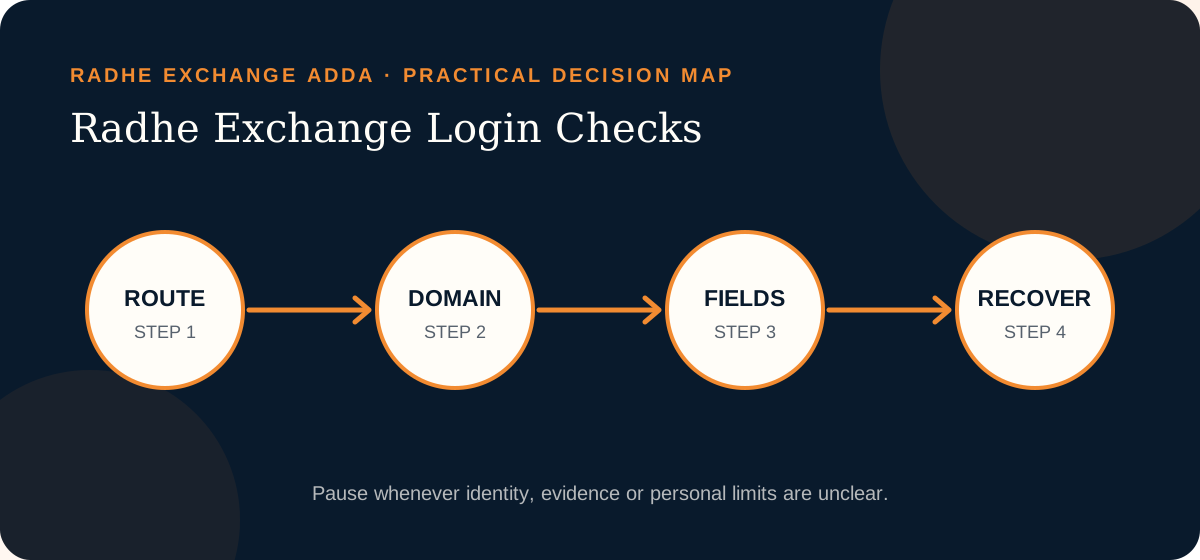
Radhe Exchange Adda decision map: move from evidence to limits and stop whenever a material check remains unresolved.
Terminology
Words that matter when assessing Radhe Exchange login checks
In a Radhe Exchange login checks decision, familiar terms may carry a precise security, legal or financial meaning. These conservative definitions help a reader evaluate domain continuity, password hygiene and recovery without allowing a promotional phrase or a login screen or person offering to fix access to stand in for evidence.
Hostname
The domain portion of the address that identifies where the browser is actually connected. In this Radhe Exchange login checks context, use the term precisely: ask who supplies the information, what can be checked, and what consequence follows if the assumption is wrong. Clear vocabulary keeps a persuasive label from doing the work of evidence.
Phishing
An attempt to capture credentials or payment information by imitating a familiar page or person. In this Radhe Exchange login checks context, use the term precisely: ask who supplies the information, what can be checked, and what consequence follows if the assumption is wrong. Clear vocabulary keeps a persuasive label from doing the work of evidence.
One-time password
A short-lived authentication code that must not be disclosed to a caller, chat contact or agent. In this Radhe Exchange login checks context, use the term precisely: ask who supplies the information, what can be checked, and what consequence follows if the assumption is wrong. Clear vocabulary keeps a persuasive label from doing the work of evidence.
Recovery route
The documented process used to regain access without handing secrets to an intermediary. In this Radhe Exchange login checks context, use the term precisely: ask who supplies the information, what can be checked, and what consequence follows if the assumption is wrong. Clear vocabulary keeps a persuasive label from doing the work of evidence.
Password reuse
Using the same secret across services, which lets one compromise spread to unrelated accounts. In this Radhe Exchange login checks context, use the term precisely: ask who supplies the information, what can be checked, and what consequence follows if the assumption is wrong. Clear vocabulary keeps a persuasive label from doing the work of evidence.
Step by step
Five ordered checks for Radhe Exchange login checks
The order supports the goal of protecting account access details on a potentially unfamiliar domain. Starting with a login screen or person offering to fix access lets another party control the route; starting with the task, source and limits keeps this Radhe Exchange login checks decision reversible until the important questions are answered.
Start from a known route
Open a bookmark or type an independently verified address. Do not let a new advert, QR code or chat message choose the credential destination. For this Radhe Exchange login checks check, record what you inspected and which source supported it. If the answer depends only on a login screen or person offering to fix access, mark it unresolved instead of filling the gap with confidence.
Read the hostname
Inspect every label in the domain and notice redirects. A valid padlock encrypts a connection but does not establish who operates the page. For this Radhe Exchange login checks check, record what you inspected and which source supported it. If the answer depends only on a login screen or person offering to fix access, mark it unresolved instead of filling the gap with confidence.
Inspect every field
A login should not need a UPI PIN, card PIN, recovery payment, screen-sharing session or remote-control installation. For this Radhe Exchange login checks check, record what you inspected and which source supported it. If the answer depends only on a login screen or person offering to fix access, mark it unresolved instead of filling the gap with confidence.
Use unique credentials
Let a password manager generate and bind a strong password to the intended hostname. Never recycle banking, email or social passwords. For this Radhe Exchange login checks check, record what you inspected and which source supported it. If the answer depends only on a login screen or person offering to fix access, mark it unresolved instead of filling the gap with confidence.
Recover separately
If access fails, close the page and locate the recovery route independently. Preserve alerts and change reused secrets from a trusted device. For this Radhe Exchange login checks check, record what you inspected and which source supported it. If the answer depends only on a login screen or person offering to fix access, mark it unresolved instead of filling the gap with confidence.
Decision table
Turn Radhe Exchange login checks signals into specific responses
A signal matters when it changes behaviour. For Radhe Exchange login checks, the table avoids unsupported “safe” or “unsafe” labels and instead connects each observation about domain continuity, password hygiene and recovery to a proportionate next action.
Signal
Why it matters
Safer response
Padlock certainty
HTTPS protects transport but can exist on a fraudulent domain.
Match the entire hostname to a route verified elsewhere. For Radhe Exchange login checks, keep the next action proportionate to the possible exposure.
OTP disclosure
A code can authorise access or a transaction for the person who receives it.
Enter it only in the intended interface; never read it to a person. For Radhe Exchange login checks, keep the next action proportionate to the possible exposure.
Recovery payment
A fee to unlock access converts a credential problem into financial exposure.
Stop and use an independently located recovery channel. For Radhe Exchange login checks, keep the next action proportionate to the possible exposure.
Repeated password
One captured password can open unrelated accounts.
Use a unique password and change every reused copy after exposure. For Radhe Exchange login checks, keep the next action proportionate to the possible exposure.
Verification notes
Build a concise record for Radhe Exchange login checks
Write down the unresolved point
For Radhe Exchange login checks, record the exact question before opening another result or message. The working question is whether domain continuity, password hygiene and recovery can support the goal of protecting account access details on a potentially unfamiliar domain. Note the hostname, date, source and the claim in its original context. This small record prevents a later page from quietly changing the issue and makes “still unknown” a usable conclusion rather than an uncomfortable gap.
Compare conflicts by source quality
When two pages disagree about Radhe Exchange login checks, do not count how many repeat each position. Ask which source is accountable, current, independent of a login screen or person offering to fix access, and directly relevant to the fact being checked. Prefer a narrow supported statement over a broad reassuring one. If neither side meets that standard, retain both links, label the conflict unresolved and avoid any action that would expose credentials, identity, device access or money.
Record why you stopped
A no-action decision protects future choices. Write the stop reason in practical language: the identity was unclear, the terms could not be retained, the legal context needed advice, or the request exceeded the chosen limit. For this Radhe Exchange login checks page, use this standing rule: A real-looking interface is not evidence of who receives the credentials. Recording the reason reduces the chance that a later countdown, different contact or newly designed page restarts the same decision without resolving the original problem.
Risks and common mistakes
Where a Radhe Exchange login checks decision can lose focus
For Radhe Exchange login checks, mistakes often begin with a login screen or person offering to fix access, a plausible explanation or one small exception—not deliberate recklessness. Naming those patterns before working toward this page’s goal—protecting account access details on a potentially unfamiliar domain—makes them easier to recognise under pressure.
Padlock certainty
HTTPS protects transport but can exist on a fraudulent domain. This matters when the practical task is protecting account access details on a potentially unfamiliar domain. The safer response is simple: match the entire hostname to a route verified elsewhere. A pause preserves choices; urgency usually removes them.
OTP disclosure
A code can authorise access or a transaction for the person who receives it. This matters when the practical task is protecting account access details on a potentially unfamiliar domain. The safer response is simple: enter it only in the intended interface; never read it to a person. A pause preserves choices; urgency usually removes them.
Recovery payment
A fee to unlock access converts a credential problem into financial exposure. This matters when the practical task is protecting account access details on a potentially unfamiliar domain. The safer response is simple: stop and use an independently located recovery channel. A pause preserves choices; urgency usually removes them.
Repeated password
One captured password can open unrelated accounts. This matters when the practical task is protecting account access details on a potentially unfamiliar domain. The safer response is simple: use a unique password and change every reused copy after exposure. A pause preserves choices; urgency usually removes them.
Practical scenarios
Three realistic Radhe Exchange login checks situations
These are decision exercises, not claims about Radhe Exchange operations. Each applies the rule “a real-looking interface is not evidence of who receives the credentials” while showing how a reader can preserve credentials, money, data or wellbeing without guessing the sender’s motive.
A saved password does not fill
Situation: A password manager that normally recognises the site does not offer the credential.
Reasoned response for Radhe Exchange login checks: The reader treats the mismatch as a warning, checks the hostname and does not paste the password manually. The useful result for a Radhe Exchange reader is a controlled process, not a perfect prediction or a decision dictated by one unverified prompt.
Support asks for an OTP
Situation: A chat contact says the code is required to confirm ownership.
Reasoned response for Radhe Exchange login checks: The user shares nothing, closes the conversation and uses a recovery route found independently. The useful result for a Radhe Exchange reader is a controlled process, not a perfect prediction or a decision dictated by one unverified prompt.
The domain redirects
Situation: The address changes after the Log in button is pressed.
Reasoned response for Radhe Exchange login checks: The user records the destination, exits, and confirms whether that transition is documented by an accountable source. The useful result for a Radhe Exchange reader is a controlled process, not a perfect prediction or a decision dictated by one unverified prompt.
Questions and answers
Focused answers about Radhe Exchange login checks
What is the first check for Radhe Exchange login checks?
State the exact task and expected destination before acting. Then test domain continuity, password hygiene and recovery through a source that is independent of a login screen or person offering to fix access. This prevents a broad brand search from becoming accidental consent, credential disclosure or payment. This editorial guide cannot make the decision safe by itself; it can only make the unresolved questions visible.
Does a polished Radhe Exchange page prove it is official?
No. For Radhe Exchange login checks, design, HTTPS, logos and search position can be useful technical or navigation signals, but none establishes operator identity on its own. Confirm the accountable party and exact hostname outside the page before relying on official-looking presentation. This editorial guide cannot make the decision safe by itself; it can only make the unresolved questions visible.
What should I save while checking?
Keep the exact URL, relevant terms, recipient or publisher details, timestamps and the source used for verification. For Radhe Exchange login checks, a contemporaneous record is more reliable than remembering a screen after it changes or disappears. This editorial guide cannot make the decision safe by itself; it can only make the unresolved questions visible.
When is leaving the right decision?
Leave when pressure rises while identity, legality, terms or personal limits remain unclear. Also stop at any request for a password, OTP, UPI PIN, remote-control access or unexplained payment. A real-looking interface is not evidence of who receives the credentials. This editorial guide cannot make the decision safe by itself; it can only make the unresolved questions visible.
Related next steps
Choose the next guide after this Radhe Exchange login checks check
Keep the goal of protecting account access details on a potentially unfamiliar domain separate from later access, registration, payment or legal questions. If the task changes, open the matching guide and begin again with its evidence. Do not carry trust from a login screen or person offering to fix access into another domain, person or decision without verification.
Hello! 👋 Do you want to Create your IPL Cricket Betting ID ?
Kisi bhi top bookie (Reddy Anna, Lotus, etc.) se apni Betting ID lo, fatak se 60 seconds mein. Tension-free khelo kyunki humara 24/7 live chat support hamesha aapke saath hai.